Post-event and renewal
After your event takes place, take a few final steps to make sure the ideas and connections can flourish.

Renew your license to organize another event, or hand your event off to a new organizer.
Post-event checklist
After the event takes place, a few tasks remain. Completion of these post-event checklist items is required if you would like to apply for another license.
1. Upload Attendee Emails for the TEDx Attendee Survey
Upload your attendee emails for the TEDx Attendee Survey within 48 hours of your event. It’s required to complete your license, and it gathers candid feedback that can motivate your team, show partners the power of your event and surface ways to improve the attendee experience.
The survey
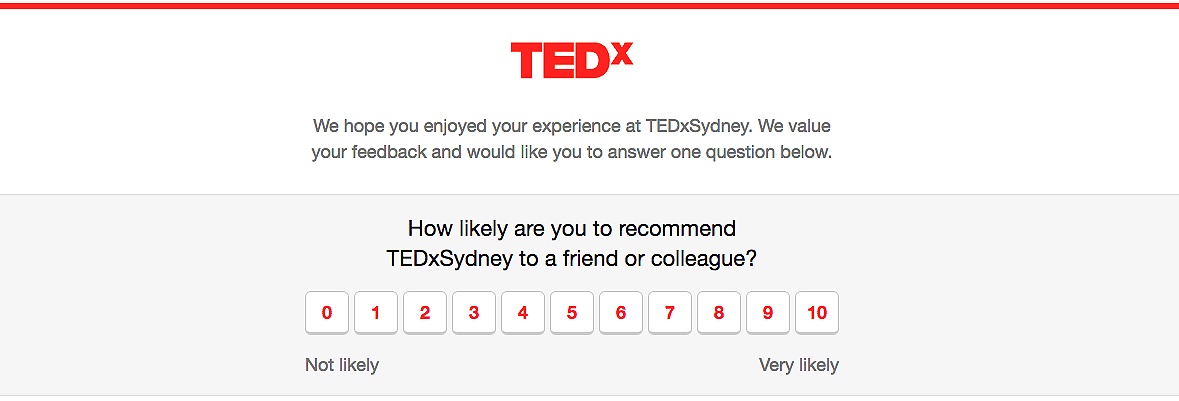
The survey asks attendees one question: “How likely are you to recommend this TEDx event to a friend or colleague?” Attendees pick a number from 0 to 10 and can add a comment on the talks, the food, or how the event was run. You can send it in more than 35 languages.
Send the survey and get responses
- The day after your event, you’ll receive an email from the TEDx team with a pre-filled link to the Attendee Survey Uploader. Submit it as soon as possible, and make sure your event page is up to date, since the email is triggered by your event date. On the survey uploader, paste your attendees’ individual email addresses — no listservs.
- To increase participation:
- Collect attendee email addresses before the event.
- Tell attendees a short survey is coming — in your closing remarks, a post-event thank-you email or on social media.
- If anyone reports they didn’t receive the survey, ask them to check their spam or promotions folder.
- Collected email addresses are used mainly to send this survey; respondents who opt in to TED communications will also receive newsletters and other emails. Your venue or local government may have data privacy policies that affect how you gather this information, so build appropriate processes — such as an opt-in at sign-up — to collect and share it in line with local laws. For questions or trouble with the survey, write to tedxpostevent@ted.com.
Understanding your score
- Several weeks after your event, you’ll receive an email with a link to a dashboard showing your score and audience responses. The Net Promoter Score system sorts responses into three groups:
- Promoters — scores of 9 or 10
- Passives — scores of 7 or 8
- Detractors — scores of 0 to 6
- Your score is not an average. It’s the net result of subtracting the percentage of detractors from the percentage of promoters, on a scale of −100 to 100. Don’t take the number at face value — every event has something to celebrate and something to improve, and attendee comments give the context and direction that the score alone can’t.
- Every team and event is unique, along with the challenges each one faces. As a direct line to your attendees, the survey surfaces specific guidance — drawing attention to things you might otherwise miss and showing exactly where to build your team’s knowledge for the next event.
2. Upload your videos
Upload your TEDx Talk videos using the TED Media Uploader, which posts them to the official TEDx YouTube channel. Do not upload to any other channel or platform. To use the Uploader, you need a TED.com profile, and your event date, duration (e.g. 8am-4pm), and location (city, state/province, country) must be listed on your event page. See step-by-step instructions in the Upload your talks section of the Film, photograph and livestream page.
*This step is only required if your event featured live speakers. For more on our publishing policy, see here.
3. Upload your photos
Share your event photos on Flickr, tagged with “TEDx” and your event name. Instructions for creating a Flickr account and uploading photos are in Film, photograph and stream.
4. Refresh your TEDx event page
Your event page gives other organizers, your local audience and the global community an up-to-date overview of your event. After the event, take a minute to update it:
- Add the link to your photos — your Flickr album or wherever they are hosted.
- Once your talks are published, add your YouTube playlist link.
- Check that your speaker list is current.
Renew your event
Renew your license to organize another event, or hand your event off to a new organizer.

Apply for renewal
Renewing means completing your post-event requirements and submitting a fresh application for your next event.
- For most event types, your TEDx license is valid for one year from its approval date, and you must re-apply for each subsequent event (check your license confirmation email for the exact details, since this varies between event types). Before you apply to renew, finish your post-event checklist first — upload your videos and photos and update your event page — since the TEDx team considers how complete these are when reviewing your renewal.
- Whatever the status of your license, the application needs a proposal for your upcoming event — for example, the kinds of ideas and presentations you’ll seek, or a new theme. Brainstorm talk ideas before you re-apply; it shows how the event will keep developing your community.
To renew, submit a renewal application:
- If your license is still active, click “Renew” next to your event name on your TED.com profile’s TEDx events page. While the license is active, this is the only way to apply for that name — it stays marked “unavailable” until the license expires.
- If your license has expired, submit a new application for that name.
- Once a license expires, the event name opens up to other prospective organizers in your city. To keep ideas from your area on a stage, the TEDx team may license the name to someone else if they apply.
Rule reminder
Your TEDx license is valid for one year from its approval date, and you must re-apply for each subsequent event.
Tip
Continue collecting talk ideas. Keep researching arguments, suggestions and interesting points so you always have an answer to: what ideas do you hope to cover at your next event?
Transfer your license
If you don’t plan to renew, another organizer may apply to continue the event. TEDx licenses aren’t automatically transferable, but the TEDx team can support a thoughtful transition.
- If you haven’t already planned for succession, review the guidance in the Plan for succession section. Once you’re confident you’re stepping down and have someone to take over:
- Let the TEDx team know. Email tedxpostevent@ted.com to say you’re ready to step down. Notifying us lets us support the transition and watch for the new application.
- Complete all post-event requirements. The requirements from your last event must be finished before another organizer can continue the series. If you have trouble uploading videos or photos, email tedxpostevent@ted.com.
- Transfer any digital assets. Any TEDx-related domain names, team emails and social media accounts must be transferred to another active TEDx licensee. Domain names, team emails and social media accounts must move to another active TEDx licensee. TED can’t cover costs to buy, transfer or resell these. Keep login details for important accounts (social media, Flickr, team email) for future teams.
- If you have questions about how to proceed, reach out to tedxpostevent@ted.com before making changes.
FAQs
What happens to an event’s license type (Community Plus/100+) if there is a change in lead organizer?
Community Plus designation is tied to the individual organizer, not the event itself. If there is a change in lead organizer, the 100+ (Community Plus) designation does not automatically carry over.
To host a 100+ event, the incoming licensee must independently qualify by attending a qualifying TEDx event.
More questions? Ask TEDxAssist!
Need more help? Visit help.ted.com